
Millions of Xerces’ invading armies were mostly defeated on the sea by the democratic city state Athens, and not by the mythical 300 Spartans!
Installing dnscrypt-proxy
$ sudo apt install dnscrypt-proxyIt will automatically runs and listen at 127.0.2.1:53.
Setting up Network Manager
Using static address
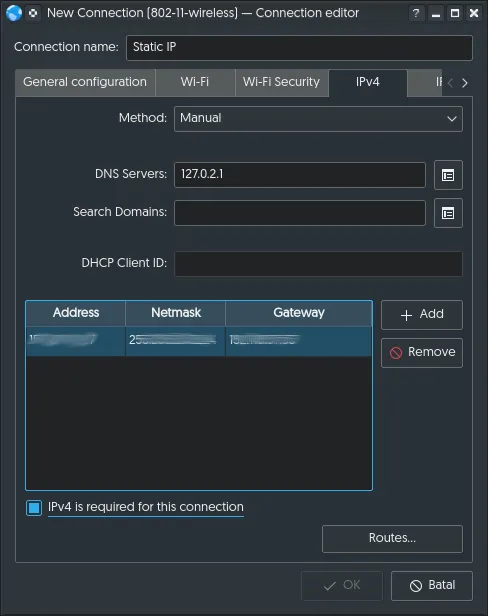
- Method: Manual
- DNS Servers: 127.0.2.1
- | Address | Netmask | Gateway | | x.x.x.x | y.y.y.y | z.z.z.z |
- [*] IPv4 is required for this connection
Using DHCP
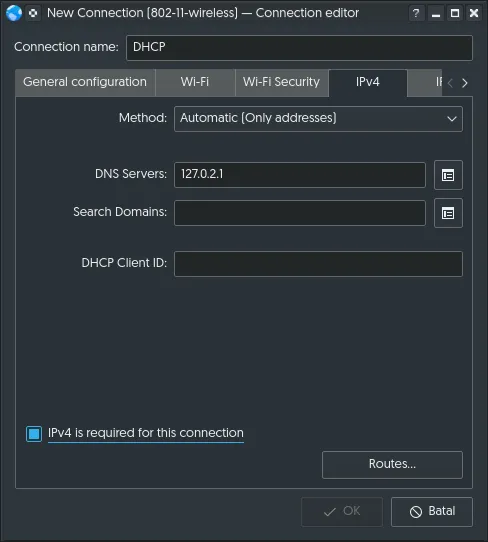
- Method: Automatic(Only addresses)
- DNS Servers: 127.0.2.1
- [*] IPv4 is required for this connection
Periodically updating DNS list
Sometimes dnscrypt-proxy isn’t working. That’s because we have to periodically
update the IP list. They dinamically change from time to time.
$ sudo wget https://raw.githubusercontent.com/jedisct1/dnscrypt-proxy/master/dnscrypt-resolvers.csv \ -O /usr/share/dnscrypt-proxy/dnscrypt-resolvers.csvDo this from time to time.
Troubleshooting
If you are not sure at what address dnscrypt-proxy runs, check systemd.
$ systemctl status -l dnscrypt-proxy● dnscrypt-proxy.service - DNSCrypt proxy Loaded: loaded (/lib/systemd/system/dnscrypt-proxy.service; enabled; vendor preset: enabled) Active: active (running) since Thu 2017-01-01 00:00:06 UTC; 16s ago Docs: man:dnscrypt-proxy(8) Main PID: 5963 (dnscrypt-proxy) CGroup: /system.slice/dnscrypt-proxy.service └─5963 /usr/sbin/dnscrypt-proxy --resolver-name=cisco
Jan 1 00:00:06 localhost dnscrypt-proxy[5963]: [WARNING] - [cisco] logs your activity - a different provider might be better a choice if privacy is a concernJan 1 00:00:06 localhost dnscrypt-proxy[5963]: [NOTICE] Starting dnscrypt-proxy 1.6.1Jan 1 00:00:06 localhost dnscrypt-proxy[5963]: [INFO] Generating a new session key pairJan 1 00:00:06 localhost dnscrypt-proxy[5963]: [INFO] DoneJan 1 00:00:06 localhost dnscrypt-proxy[5963]: [INFO] Server certificate #1463092899 receivedJan 1 00:00:06 localhost dnscrypt-proxy[5963]: [INFO] This certificate is validJan 1 00:00:06 localhost dnscrypt-proxy[5963]: [INFO] Chosen certificate #1463092899 is valid from [2016-05-13] to [2017-05-13]Jan 1 00:00:06 localhost dnscrypt-proxy[5963]: [INFO] Server key fingerprint is 0000:1111:2222:3333:4444:5555:6666:7777:8888:9999:AAAA:BBBB:CCCC:DDDD:EEEE:FFFFJan 1 00:00:06 localhost dnscrypt-proxy[5963]: [NOTICE] Proxying from 127.0.2.1:53 to x.x.x.x:443Jan 1 00:00:06 localhost systemd[1]: Started DNSCrypt proxy.See this line:
Jan 1 00:00:06 localhost dnscrypt-proxy[5963]: [NOTICE] Proxying from 127.0.2.1:53 to x.x.x.x:443It tells you at which address and port dnscrypt-proxy listens for request.
Watch out! there are two DNS resolver run on your system. First is dnsmasq (default DNS cacher in most recent GNU/Linux that uses Network Manager). And second is dnscrypt-proxy. Their default IP.
| dnsmasq | 127.0.1.1 |
| dnscrypt-proxy | 127.0.2.1 |