Configuration
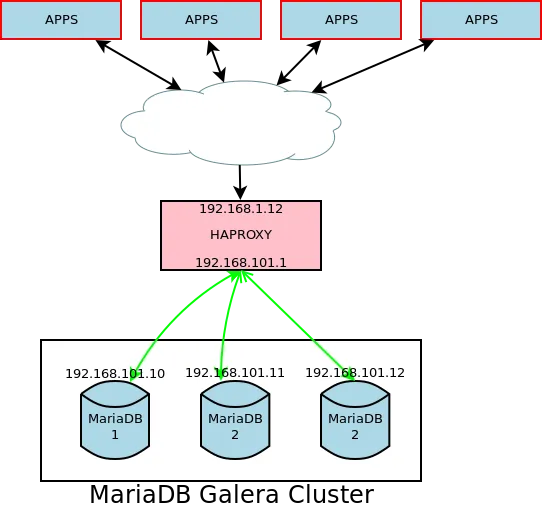
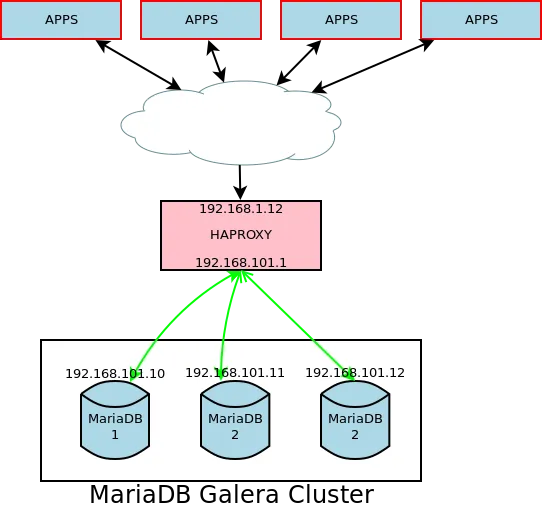
There are 4 servers.
HAProxy, 2 nodes:
- IP 1: 192.168.1.12
- IP 2: 192.168.101.1
MariaDB, 3 nodes: (for quorum)
- MariaDB1 (192.168.101.10)
- MariaDB2 (192.168.101.11)
- MariaDB3 (192.168.101.12)
Installing MariaDB
Takes three steps:
- setup repository
- add repo keyring
- install MariaDB
Adding MariaDB Debian repository
Alternative I
$ cat > /etc/apt/sources.list.d/mariadb.list << EOF# MariaDB 10.1 repository list - created 2016-07-22 08:52 UTC# http://downloads.mariadb.org/mariadb/repositories/deb [arch=amd64,i386] http://mariadb.biz.net.id/repo/10.1/debian jessie maindeb-src http://mariadb.biz.net.id/repo/10.1/debian jessie mainEOFAlternative II
$ sudo apt-get install software-properties-common$ sudo add-apt-repository 'deb [arch=amd64,i386] http://mariadb.biz.net.id/repo/10.1/debian jessie main'Add GPG keyring
Add MariaDB Debian repository keyring
$ sudo apt-key adv --recv-keys --keyserver keyserver.ubuntu.com 0xcbcb082a1bb943dbInstall MariaDB
Installing MariaDB server will also automatically install RSYNC and Galera Cluster
$ sudo apt-get install mariadb-serverConfiguring Galera
There are three steps to up the Galera cluster:
- configure each nodes for galera.
- run one node as the first in node.
- run the two other nodes.
MariaDB1, MariaDB2, MariaDB3
Do this on all the MariaDB servers.
$ cat > /etc/mysql/conf.d/galera.cnf << EOF[mysqld]#mysql settingsbinlog_format=ROWdefault-storage-engine=innodbinnodb_autoinc_lock_mode=2innodb_doublewrite=1query_cache_size=0query_cache_type=0bind-address=0.0.0.0
#galera settingswsrep_on=ONwsrep_provider=/usr/lib/galera/libgalera_smm.sowsrep_cluster_name="apakek_cluster"wsrep_cluster_address=gcomm://192.168.101.10,192.168.101.11,192.168.101.12wsrep_sst_method=rsyncEOFYou can creatively change the name galera.cnf into galerbiji.cnf or any name that
your brain could summon.
MariaDB1
For simplicity, lets assume we want to make MariaDB1 as the first master.
Debian with systemd (e.g. Jessie)
$ sudo /usr/bin/galera_new_clusterDebian with other sysinit
sudo service mysql start --wsrep-new-clusterFinal check
To check how many node run on the cluster.
$ sudo mysql --defaults-file=/etc/mysql/debian.cnf -e 'SELECT VARIABLE_VALUE as "cluster size" FROM INFORMATION_SCHEMA.GLOBAL_STATUS WHERE VARIABLE_NAME="wsrep_cluster_size"'+--------------+| cluster size |+--------------+| 1 |+--------------+MariaDB2, MariaDB3
The rest of the nodes.
Debian with systemd (e.g. Jessie)
$ sudo systemctl start mysqlDebian with other sysinit
$ sudo service mysql startFinal check
Final check how many node run on the cluster.
$ sudo mysql --defaults-file=/etc/mysql/debian.cnf -e 'SELECT VARIABLE_VALUE as "cluster size" FROM INFORMATION_SCHEMA.GLOBAL_STATUS WHERE VARIABLE_NAME="wsrep_cluster_size"'+--------------+| cluster size |+--------------+| 3 |+--------------+Excercise
Create admin users that could be accessed via network is left as an excercise to the reader.
HAProxy
Create a user for HAProxy. This user is used to ping check health status.
$ sudo mysql --defaults-file=/etc/mysql/debian.cnf -e "CREATE USER 'haproxy'@'192.168.101.1'"Append these lines in /etc/haproxy/haproxy.cfg file.
# Load Balancing for Galera Clusterlisten galera 192.168.1.12:3306 balance source mode tcp option tcpka option mysql-check user haproxy server node1 192.168.101.10:3306 check weight 1 server node2 192.168.101.11:3306 check weight 1 server node2 192.168.101.12:3306 check weight 1Restart HAProxy.
$ sudo service haproxy restartDone.
Optimization
There are things that can be done to optimize:
- Replacing HAProxy with hardware load-balancer .
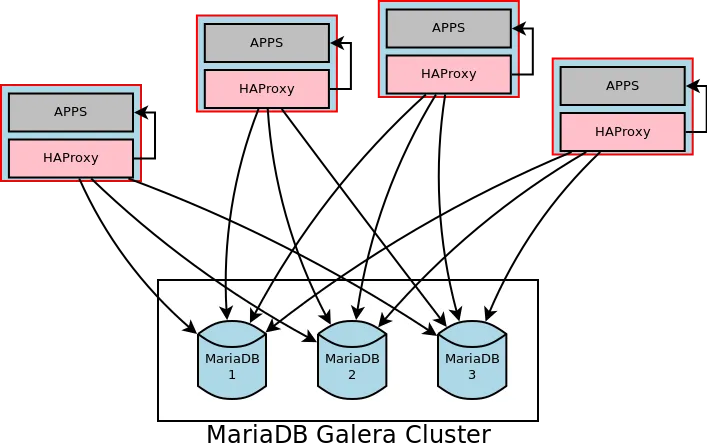
- Setup HAProxy as gateway/interface to application in each node.
- Use cookbook like Chef, Puppet or Ansible to automate this process.
Further Read
- HAProxy — Galera Cluster Documentation
- Node Failure and Recovery — Galera Cluster Documentation
- Starting the Cluster — Galera Cluster Documentation
- How to Deploy Galera Cluster for MySQL using Docker Containers :: Severalnines
- MariaDB 10.1 Galera Cluster on Debian 8 Jessie - Sprinternet Blog
- MySQL :: MySQL 5.5 Reference Manual :: 6.3.2 Adding User Accounts
- Planet MySQL - Archives - The Galera installation guide for dummies.
- WordPress JP: Installing MariaDB – Wannabe Exceptional